What's New
March Release Highlights
This month’s update introduces automated AI context refreshing for JAS, flexible “Any vs. All” filter loading for dashlets, and seamless infinite scrolling for filter menus. Additionally, our team has successfully addressed 239 issues to optimize overall platform performance.
Advanced JAS Context & RAG Automation
To ensure JAS perfectly understands your unique data structures, we have upgraded how its Retrieval-Augmented Generation (RAG) memory is maintained. This enhancement works in two interconnected ways:
1. User-Defined Descriptions
JAS now actively utilizes your existing manual descriptions for Nodes and Expressions (the measures and dimensions in your dashlets). By directly feeding your custom definitions into its contextual memory, the AI grasps your specific business terminology faster and with much greater precision.
2. Automated Metadata Refresh
Building on JAS’s existing ability to generate its own explanations for your backend data, we introduced a new “Context Refreshing” page under the administration menu to put AI knowledge management on autopilot.
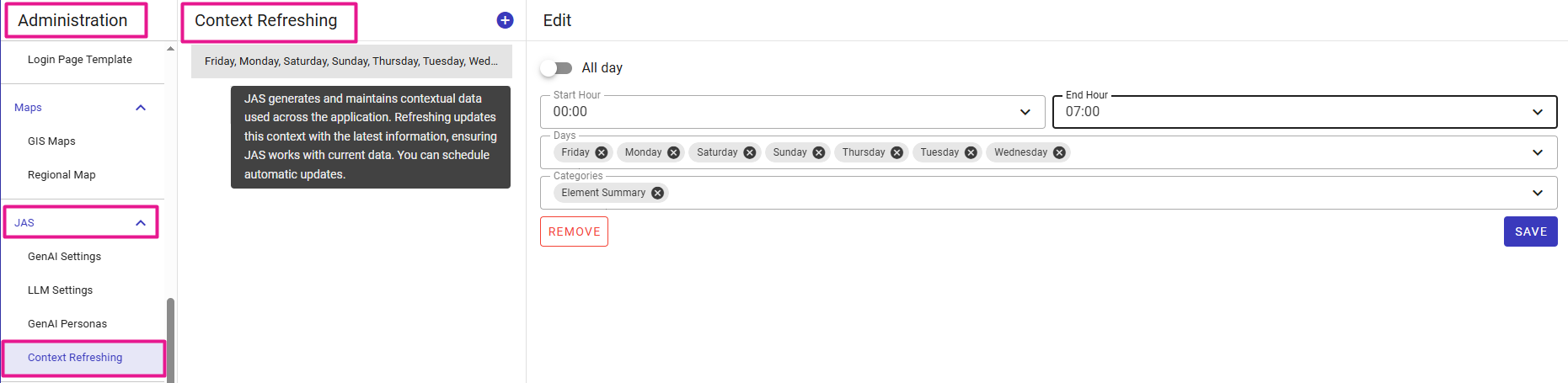
Schedule automated, recurring updates to keep JAS's metadata continuously synced as your models evolve.
By seamlessly combining your custom descriptions with this continuously refreshed AI knowledge base, JAS instantly detects the most relevant data to consistently deliver highly accurate insights to your end users.
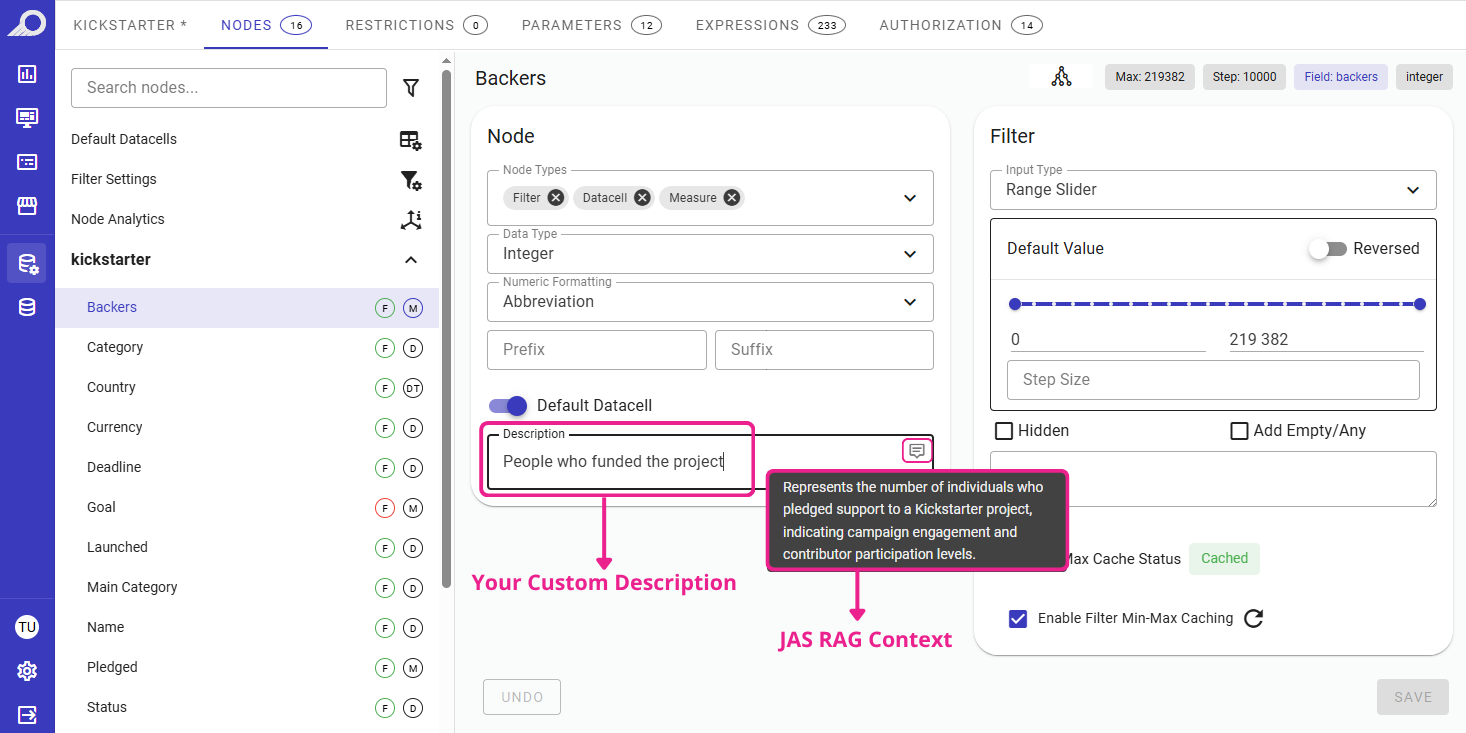
JAS seamlessly integrates your manual descriptions alongside its auto-generated refreshed context.
Flexible Dashlet Filtering: “Any” vs. “All” Filters
We have enhanced the existing “Don't Show Without Filter” setting to provide a smoother experience for end users. Previously, when a dashboard designer selected multiple required filters for a dashlet, the end user was forced to apply every single one of them before the data would load.
Now, we have introduced a new “Show if Any Selected Filter is Applied” checkbox. When the designer enables this option, it changes the rule: the end user now only needs to apply at least one of the required filters to view the dashlet.
This simple addition gives end users the flexibility to explore data using just the specific filters they care about, without being forced to fill out every single required field just to see the visualization. Experience the difference firsthand on this dashboard to see exactly how these settings react to your inputs.
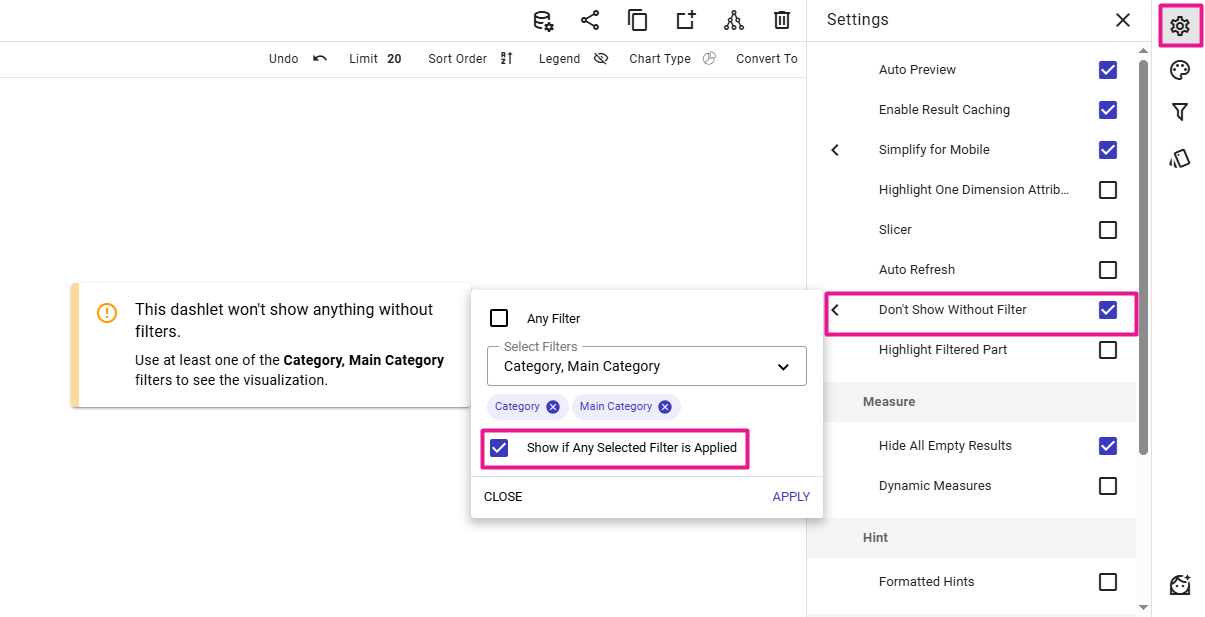
Designers can enable this option to give end-users the flexibility to explore data without filling out every single required filter.
Infinite Scroll: Seamless Lazy Loading for Filter Values
To deliver a smoother, more intuitive user experience, we have upgraded the component behavior of our filter dropdowns. Previously, when browsing large datasets within a filter, users would hit a static display limit at the bottom of the list showing a message like “259 more options”. To access those remaining values, users were forced to stop scrolling and manually type into the search bar.
Now, we have implemented seamless lazy loading (infinite scroll) directly into the filter menus. As users scroll to the bottom of the list, the next page of values loads automatically. This eliminates unnecessary UI friction, allowing users to effortlessly browse through extensive filter options without ever breaking their workflow.

Stop building dashboards, and start getting answers. Experience the next era of BI with our leading GenAI capabilities ‒ request your personalized free demo today.