Legend & Custom Color Scale Controls
⚡Solr Native Driver for Full-Text Search
📁Upgraded Uploads Editor
July Release Highlights
This month's update brings a redesigned legend panel with continuous custom color scales for your charts, a native Apache Solr driver that makes full-text search across massive document collections lightning fast, and an upgraded uploads editor that now accepts videos and documents for use inside your dashboards. Additionally, our team has successfully addressed 237 issues to optimize overall platform performance.
New Legend and Custom Color Scale Controls
Positioning a legend exactly where you want it — and coloring your data exactly how you mean it — is now far more convenient. A new "Legend" button on the playground toolbar opens a redesigned panel that gathers every legend-related setting in one place. A "Show Legend" toggle turns the legend on or off, while a new nine-position placement grid lets you drop it anywhere on the chart — from Top Left to Bottom Right, including dead Center — with a Horizontal or Vertical orientation switch to match your layout.
The same panel also makes continuous color scales dramatically easier to set up. Enable "Use Custom Color Scale" and choose between Single, Double, or Triple gradient modes, then pick your own Min, Mid, and Max colors. Your chart instantly reflects the gradient across its values, and the legend renders as a smooth color ramp showing the minimum and maximum of your measure — perfect for heat-style emphasis on bar charts and beyond.
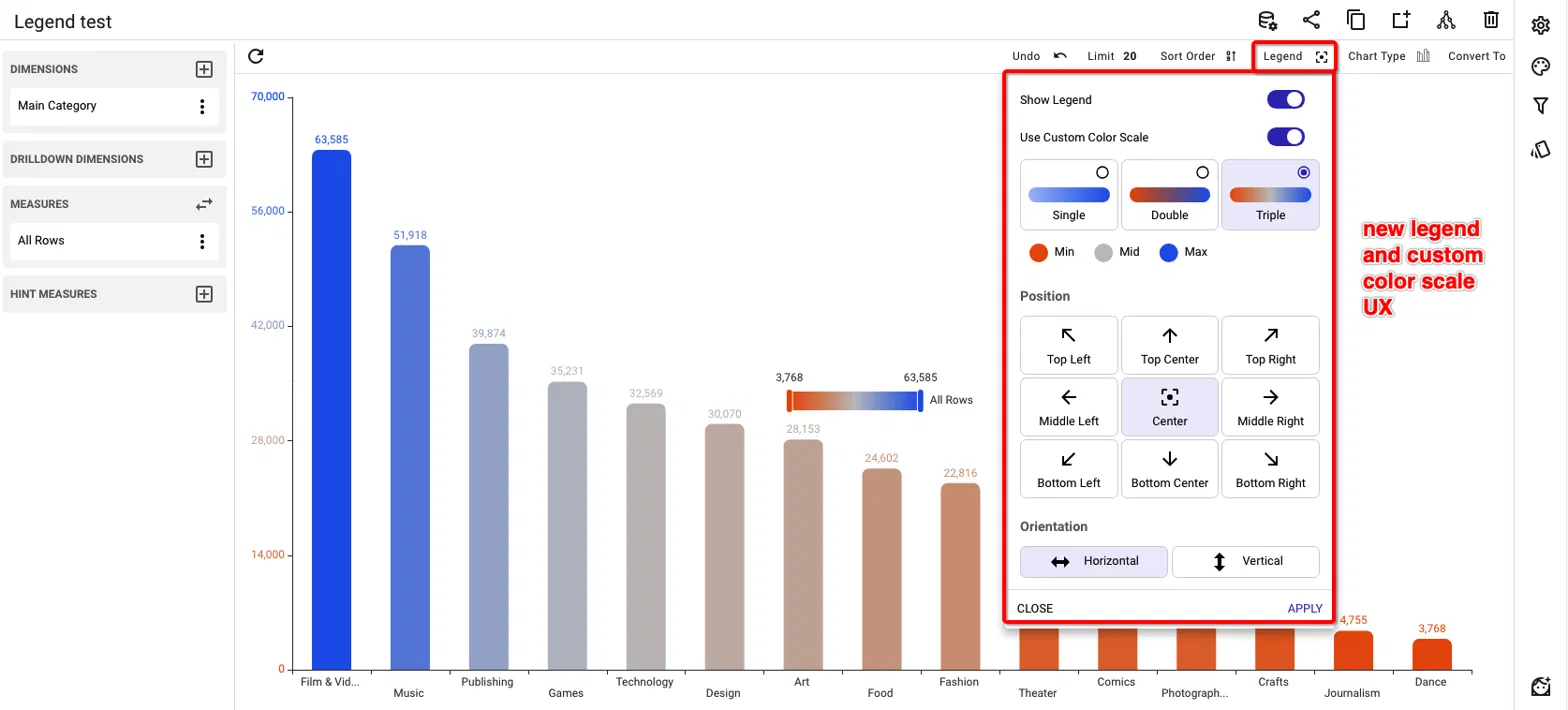
Open the new Legend panel from the playground toolbar to control visibility, position, orientation, and a fully custom continuous color scale.
Native Solr Driver: Lightning-Fast Full-Text Search
TURBOARD now ships with a native Apache Solr driver, bringing the speed of a dedicated full-text search engine directly into your dashboards. When your analysis involves searching through big text documents — like the full content of thousands of indexed websites — queries that used to be heavy now return in a flash. And because the driver speaks Solr natively, TURBOARD also leverages Solr's faceted navigation performance out of the box: your filters and category breakdowns are computed by the engine itself, keeping even huge document collections responsive.
In the example below, a single keyword typed into a Website Search filter scans tens of thousands of company websites indexed in Solr, and the entire dashboard — map distribution, counters, and category facets — updates instantly with the matching companies.
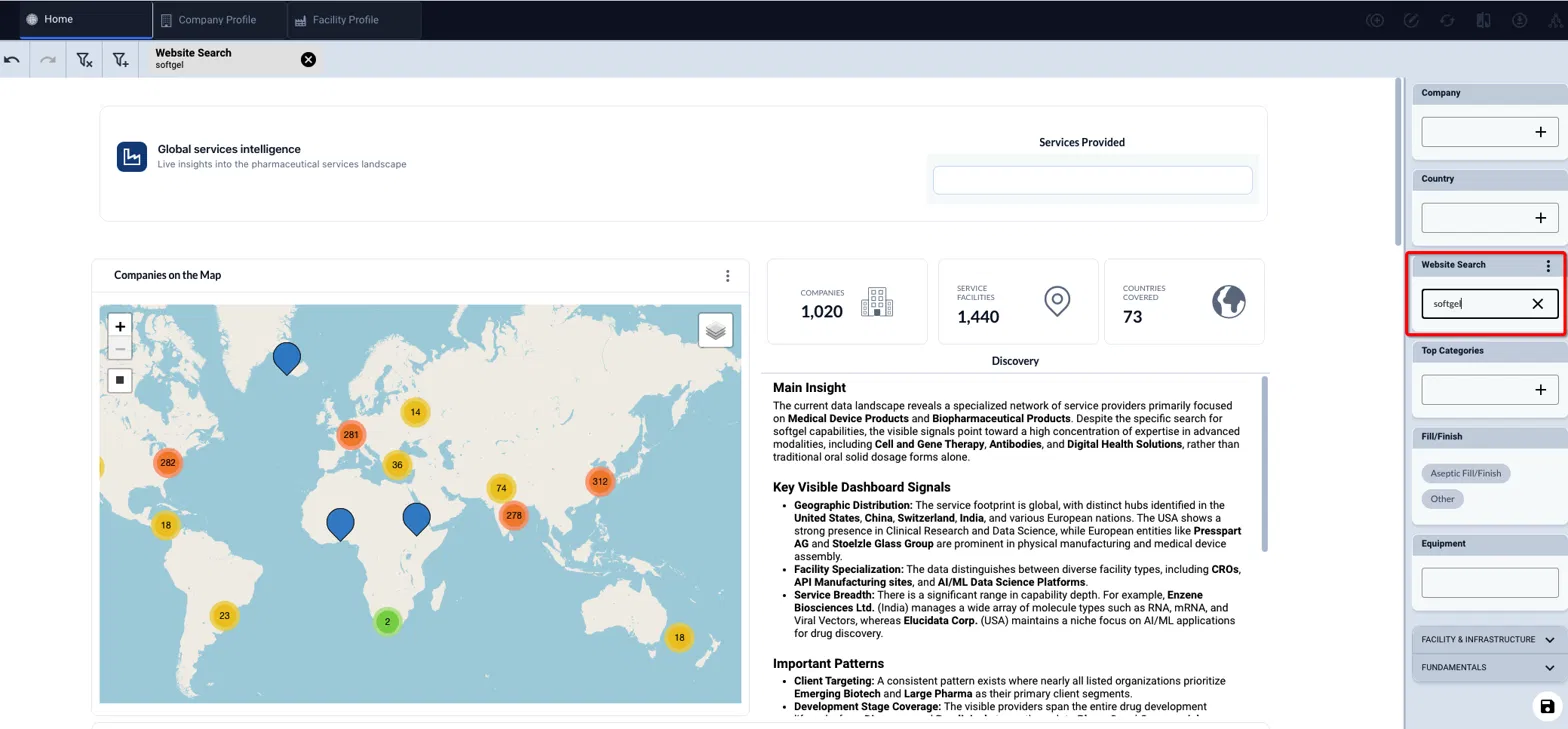
A keyword search across tens of thousands of indexed company websites, answered instantly by the native Solr driver with faceted filters.
Upgraded Uploads Editor: More File Types, Search, and Rename
The Uploads editor in the dashboard playground has grown up. Beyond images, users can now upload MP4 videos, PDF, DOCX, and PPTX files, making them available to embed and use inside htmlets on your dashboards — think product videos, reference documents, or slide decks living right next to your data.
Managing a growing library is easier too: a new search box finds any file instantly, and each file's menu now offers Copy URL, Rename, and Delete — so grabbing a file's link for an htmlet, or keeping names tidy, takes just a click.
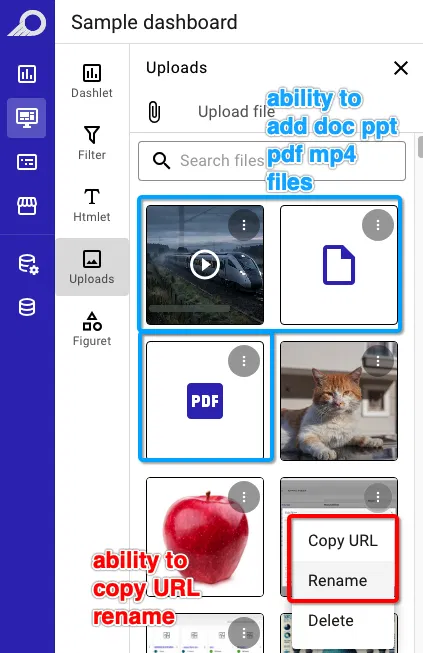
The upgraded Uploads editor now accepts MP4, PDF, DOCX, and PPTX files, with instant search, rename, and copy-URL actions.

Stop building dashboards, and start getting answers. Experience the next era of BI with our leading GenAI capabilities ‒ request your personalized free demo today.