Data Security with TURBOARD: Clear Boundaries, You Stay in Control

When evaluating a business intelligence platform, it is important to look beyond features. You also need to understand where data is processed, which components can access it, and under what conditions AI features communicate with external services. TURBOARD enables these decisions to be managed at the deployment and configuration levels.
There is no single answer to “Where is the data stored?” or “Does the AI feature send data outside the environment?” that applies to every deployment. The answer depends on the deployment model, data-access method, active modules, and external connections configured by the customer.
This guide explains the data boundary and JAS LLM connection options, with a particular focus on deployments running in customer-controlled infrastructure.
The Deployment Model Determines Data Residency
TURBOARD can be deployed in the customer’s public-cloud account, private cloud, or on-premises infrastructure. With public-cloud providers such as AWS, Azure, and GCP, the customer can select the region and infrastructure account. In an on-premises deployment, the application runs on the customer’s own servers.
The application, data connections, and user access are managed within the customer’s chosen cloud account, private cloud, or on-premises environment.
Live Connection and Imported Data Models
TURBOARD supports two data-access models. An authorized user selects the model when creating the data source.
In both models, data-source connections use TLS 1.2 or later and are restricted through a read-only database user.
Source data remains in the existing system
Queries run against the source system on demand, and TURBOARD does not create a persistent copy of the source business data.
Selected data is loaded into the TURBOARD Imported database
Selected data can be transferred to TURBOARD’s Imported database according to performance requirements and the desired load on the source system.
The Imported database follows the same deployment model and operates within the same environment boundary as the TURBOARD application.
For more information, see our blog post, “How TURBOARD Keeps Its Performance on Top.”
The Data Boundary in a Self-Hosted Environment
In a self-hosted deployment, application components and data connections run inside infrastructure controlled by the customer.
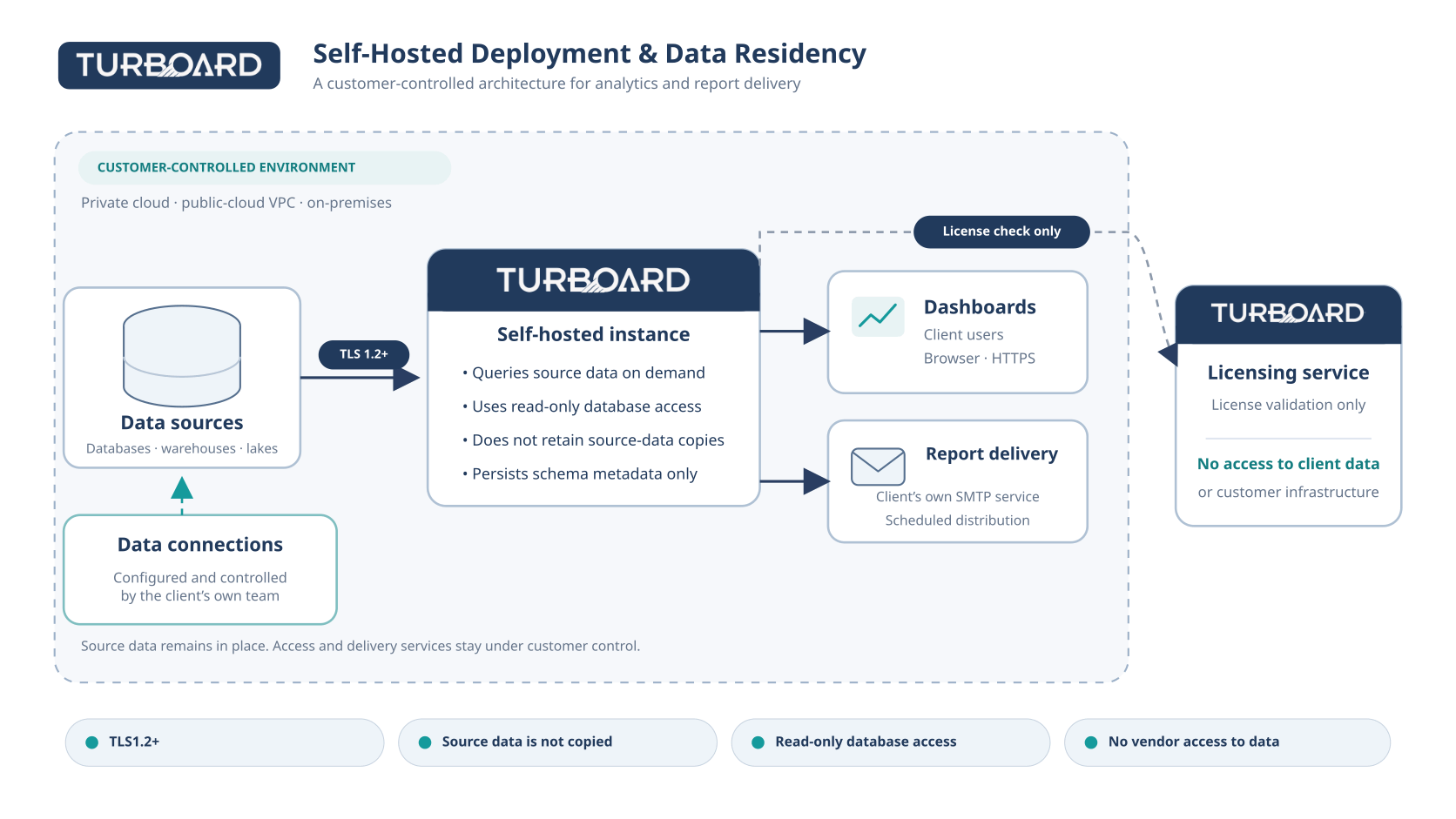
Source business data
With a Live Connection, it remains in the source system. With the Imported model, only selected data is loaded into the Imported database running in the same self-hosted environment as TURBOARD.
Schema metadata
Table and field structures may be stored in the TURBOARD deployment within the customer environment so they can be used by the platform.
Query results
They may be processed temporarily while a dashboard is rendered or held in an in-memory cache inside the customer environment for performance.
Connection details
They are stored in encrypted form; data connections are created and managed by the customer’s authorized team.
JAS and the LLM Data Path
JAS is an optional TURBOARD module. Enabling it through the license file does not automatically establish an LLM connection. An external AI data path is created only when an authorized admin user explicitly configures an LLM connection.
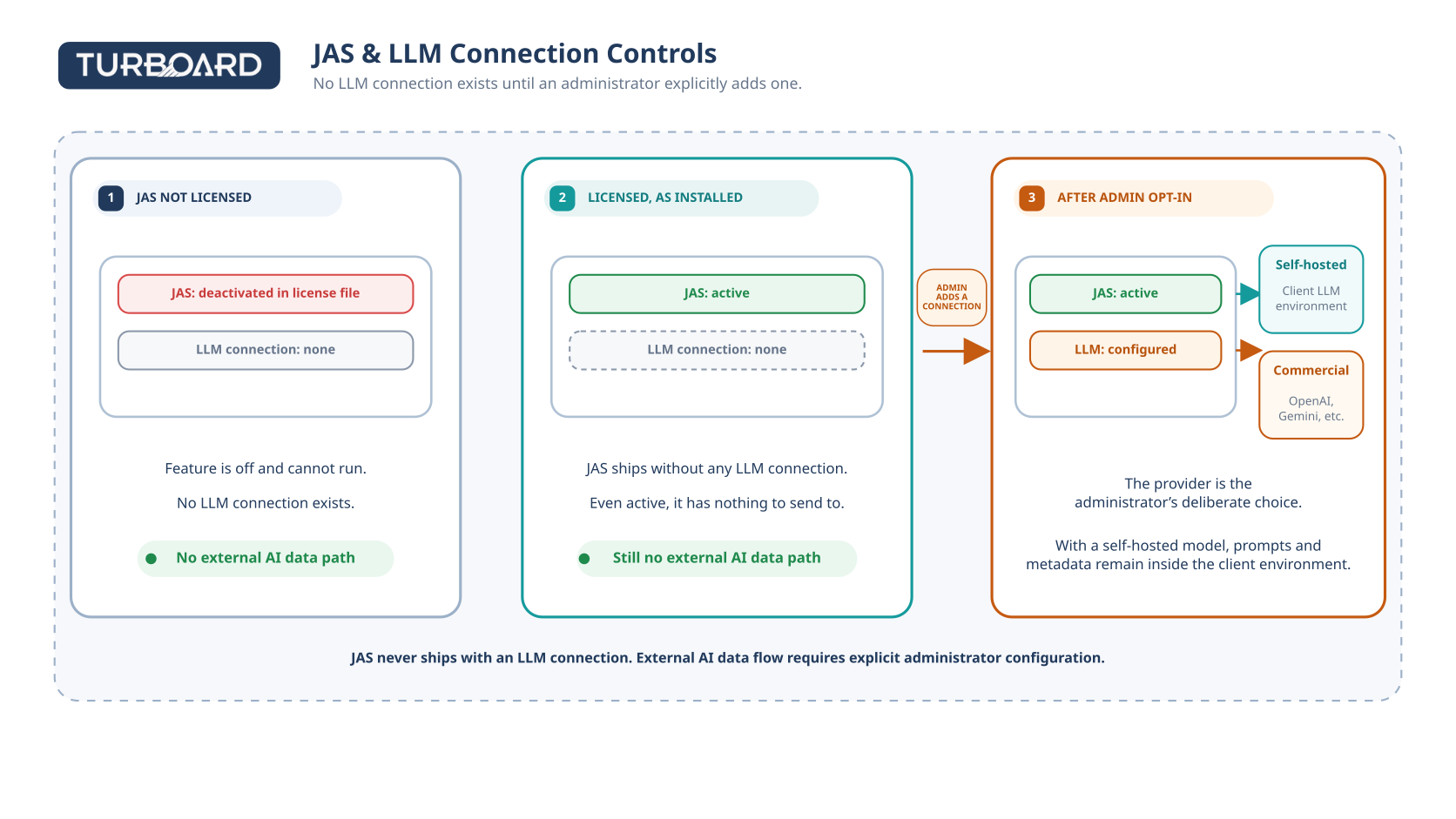
JAS is not licensed
The module is disabled at the license level.There is no LLM connection or AI endpoint to which data could be sent. JAS does not send prompts, query data, or schema metadata to an external LLM.
JAS is licensed, with no LLM connection
The module is available, but the external data path remains closed.JAS does not ship with a preconfigured connection to OpenAI, Gemini, or any other LLM. Until an endpoint is configured, no external AI traffic is generated.
An authorized admin user has added an LLM connection
The data path depends on the selected model and provider.The admin user can choose a self-hosted model running in the customer environment or a commercial LLM provider. The information sent and its processing location depend on this configuration.
JAS never ships with an LLM connection. Licensing JAS and connecting it to an external LLM are separate decisions. External data flow requires an explicit connection configured by an authorized admin user.
Self-Hosted and Commercial LLM Options
JAS is LLM-independent. Different model options can be used according to the organization’s security policies, regulatory obligations, and technical capabilities.
Processing can remain in the customer environment
The model can run in the customer’s public-cloud account, private cloud, or on-premises servers. With this configuration, JAS requests and related metadata remain within the customer environment boundary.
The customer selects the provider
When a provider such as OpenAI or Gemini is configured, its processing region, retention terms, and subprocessors should be evaluated under the selected provider’s agreement.
The configuration choice belongs to the customer. Authorized admin users can control which model is used, which endpoint is connected, and who manages that connection.
External Connections and Subprocessors
A self-hosted deployment can be configured without a third-party subprocessor handling customer data. Services selected separately by the customer should nevertheless be assessed as part of their own data-processing chains.
License validation
TURBOARD’s external software connection can be limited to license validation. This process does not require access to customer data or the customer database.
Customer SMTP service
When scheduled reports are sent through the customer’s chosen SMTP infrastructure, that service becomes part of the customer’s data-processing chain.
Commercial LLM provider
If a commercial model is selected for JAS, the provider’s processing region, retention policy, and subprocessors should be reviewed separately.
Practical outcome: Data residency should be evaluated not only by the location of the TURBOARD deployment, but also together with every LLM, SMTP, and other external connection added by the customer.
Security Checklist
To document the actual data boundary of a deployment, the following decisions should be recorded explicitly.
Define the deployment environment and region
Record the public-cloud account, private cloud, or on-premises environment and the region to be used.
Document the data-access model
Specify whether each data source uses a Live Connection or the Imported model.
Restrict connection privileges
Verify the read-only database user, TLS version, and management of connection details.
Record the JAS license status
If JAS will not be used, document that it is disabled at the license level. If it will be used, document the authorized admin users.
Assess the LLM connection separately
Record the self-hosted or commercial model choice, endpoint, processing region, and provider terms.
Include other external services in the data flow
Evaluate license validation, SMTP, and other customer-configured services together.
Frequently Asked Questions
Does TURBOARD retain a persistent copy of customer data?
It depends on the selected connection model. With a Live Connection, no persistent copy of the source business data is created. With the Imported model, selected data is loaded into TURBOARD’s Imported database, which runs in the same deployment environment as TURBOARD.
Who selects the connection model?
An authorized user selects Live Connection or Imported when creating the data source.
Does JAS send data to OpenAI or another provider by default?
No. JAS does not ship with an LLM connection. An external data path is created only when an authorized admin user configures an LLM endpoint.
Can JAS be used without data leaving the customer environment?
Yes. When a self-hosted LLM running in the customer environment is selected, JAS requests and related metadata remain within the same infrastructure boundary.
Can JAS be disabled completely?
Yes. JAS can be disabled at the license level. Even when licensed, there is no external AI endpoint unless an LLM connection is configured.
Are there subprocessors in a self-hosted deployment?
The deployment can be configured without a third-party subprocessor handling customer data. A commercial LLM, SMTP service, or other external service selected by the customer should be assessed separately under its own agreement and responsibility model.
In Summary
TURBOARD’s deployment model, data-access method, and JAS connections are separate security decisions. A self-hosted deployment keeps the application in the customer environment. Live Connection keeps source data in place, while the Imported model loads selected data into the Imported database running in the same deployment environment as TURBOARD.
JAS does not send data externally merely because it is licensed. An external LLM data path is created through the explicit configuration of an authorized admin user and is governed by the conditions of the selected provider.
A clear data boundary is the foundation of security. When the deployment environment, data-access model, JAS license, and external connections are documented together, it becomes clear where data is processed and under which conditions it may leave the environment.
Latest Blogs




Stop building dashboards, and start getting answers. Experience the next era of BI with our leading GenAI capabilities ‒ request your personalized free demo today.